Infusion Technology Solutions Blog

Technology related solutions, tips, tricks, and other interesting topics

How to Change the SFTP Port In Dreamweaver CS3

November11

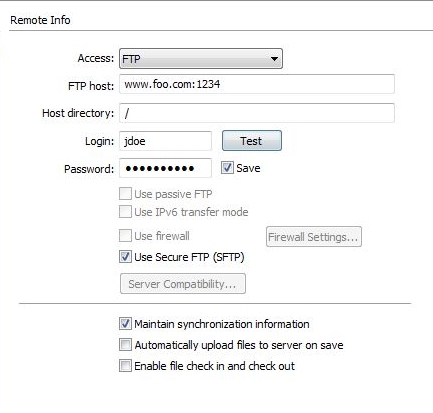
When you set up a SFTP server connection for a website in Dreamweaver, the default port used is 22. If you want to use a different port then you need to add a “:portNumber” at the end of the “FTP Host” address field. For example, suppose your web server has an address of www.foo.com and SFTP has been configured on the server to listen on port 1234. In Dreamweaver you need to set the FTP host address to “www.foo.com:1234″.

This technique may work for other versions of Dreamweaver but I am not sure. I have only tested this with Dreamweaver CS3.

PHP Parse error: syntax error, unexpected $end

July26

The following error may appear in your Apache error log file or displayed on a PHP web page:

Parse Error: syntax error, unexpected $end in ….. scripts.php on line …

If you are running PHP 5 then that means you probably need to enable the PHP configuration file option “short_open_tag”. In your php.ini file enable the option as follows:

short_open_tag = On

How to Query Multiple Databases in PHP

May3

You can perform a SQL query against more than one database with PHP. Here is a sample generic SQL query against two databases:

SELECT image.image_title, greetings.date
FROM db1.image, db2.greetings
WHERE greetings.image_id=image.imageid

And here is some PHP sample code on how you would query two databases in a single SQL statement:

$query="INSERT INTO db1.table1 SELECT * FROM db2.table2 WHERE a=1";
mysql_query($query,$connection);

How to Check if an Apache Module Has Been Loaded

April29

Sometimes it is useful in the Apache configuration httpd.conf file to only apply configuration settings if a particular module has already been loaded. Or it is useful to load settings in the event an Apache module has not been loaded. Here is how to handle both cases:

<IfModule module_identifier>
  # do these Apache settings if the module has already been loaded
</IfModule>
<IfModule !module_identifier>
  # do these Apache settings if the module has NOT already been loaded
</IfModule>

Here are some examples:

<IfModule !php5_module>
  # If the PHP5 module has NOT already been loaded, load it
  LoadModule php5_module modules/libphp5.so
</IfModule>
<IfModule php5_module>
  # If the PHP5 module has already been loaded, then do these settings
  AddHandler php5-script .php
  AddType text/html .php
  DirectoryIndex index.php
</IfModule>

The module_identifier argument can be either the module identifier or the file name of the module, at the time it was compiled. For example, rewrite_module is the identifier and mod_rewrite.c is the file name. If a module consists of several source files, use the name of the file containing the string STANDARD20_MODULE_STUFF. You can read more about the <IfModule> Apache directive in the Apache documentation.

« Older Entries