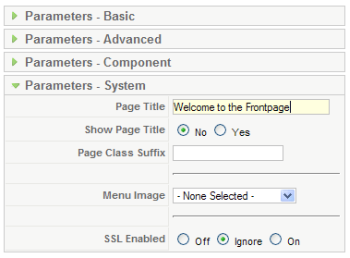
If you install a new installation of Joomla! 1.5 on your server, you will see the “Welcome to the Frontpage” title on your Frontpage. It took me awhile to figure out how to change this. Here is how you do it:
Go to your Joomla! 1.5 Administration site and login. In your administration site go to:
- Menus – Main Menu (now you are in: Menu Item Manager: mainmenu).
- Click on ‘Home’ link to edit this link (you are now in: Menu Item: Edit).
- Click on Parameters System and change or delete the Page title.
- If you change the Page title, the changed title will be displayed on your Frontpage as a title.
- If you delete the Page title, the menu link name will be displayed on your Frontpage as a title (in the this case “Home” will be displayed as title, because “Home” is the name of the link to the Frontpage).
- If you don’t want to display any title, set Show Page Title below Page title parameter to “No”.
- Don’t forget to save the changes.