How to Change the SFTP Port In Dreamweaver CS3

In: Web Development

11 Nov 2008

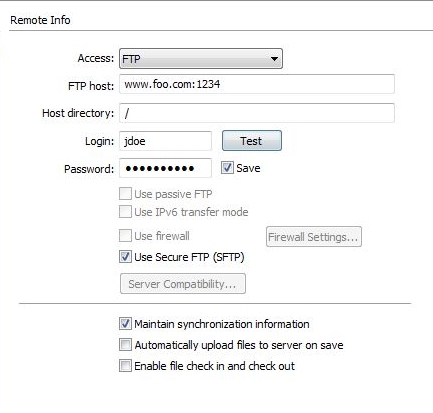
When you set up a SFTP server connection for a website in Dreamweaver, the default port used is 22. If you want to use a different port then you need to add a “:portNumber” at the end of the “FTP Host” address field. For example, suppose your web server has an address of www.foo.com and SFTP has been configured on the server to listen on port 1234. In Dreamweaver you need to set the FTP host address to “www.foo.com:1234″.

This technique may work for other versions of Dreamweaver but I am not sure. I have only tested this with Dreamweaver CS3.

1 Response to How to Change the SFTP Port In Dreamweaver CS3

Avatar

Ron

March 7th, 2011 at 8:14 pm

Thanks. That’s very helpful!

Comment Form

About this blog

This blog is about technology related topics. It will primarily contain problems and solutions to IT problems that I encounter on a day-to-day basis. In addition interesting things I come across either on or off the internet will be posted here as well. I will also include step-by-step tutorials to common tasks people may need to do with their computers.

Web Hosting Discount

    Get the first month for only $0.01 using coupon code HGCOUPONBLOG. No contracts, cancel anytime.

Revolutionary One Time Password Device

Add to Technorati Favorites