Archive for January, 2008

This procedure is handy if you are wanting to make a computer appear as it first came out of the box. It is useful if you plan on reselling your computer or are preparing a generic image with some modifications for mass deployment in a large organization. Here are the Terminal commands to delete a [...]

Up to now, only Windows and Linux users have been able to use the great encryption program Truecrypt. The benefits of TrueCrypt is that it offers VERY secure methods of encryption and the encrypted files it makes can be read on both Windows and Linux computers making it cross-platform and people could share files between [...]

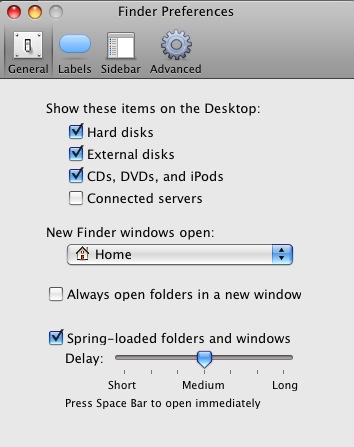
By default mounted server file shares are no longer displayed on the desktop on Leopard as it was in Tiger. You can reactivate this behavior by enabling the Finder preference option labeled “Show these items on the Desktop: Connected servers”. To get to the Finder preferences, click any where on the desktop once and then [...]

Go to the Terminal and issue the command: sudo setfile -a V /Volumes/paritionName where “partitionName” is the name of the partition or drive that you want to hide. This hides the partition from being seen in the Finder but you can still access it from the terminal such as with scripts.


About this blog

This blog is about technology related topics. It will primarily contain problems and solutions to IT problems that I encounter on a day-to-day basis. In addition interesting things I come across either on or off the internet will be posted here as well. I will also include step-by-step tutorials to common tasks people may need to do with their computers.

Web Hosting Discount

    Get the first month for only $0.01 using coupon code HGCOUPONBLOG. No contracts, cancel anytime.

Revolutionary One Time Password Device

Add to Technorati Favorites